
EMEET SmartCam C960 Ultra
プレミアムデザイン 超高精細 4K ウェブカメラ
¥17,980
通常価格
Tax included.
Shipping calculated at checkout.
1/1.5 型ソニー製大型イメージセンサー
暗所でも鮮明なディテールとノイズの少ないクリアな映像を再現します。
UHD 4K 高画質
プロフェッショナル級 4K 解像度を実現。1080P 時にはスムーズな 60fps での駆動に対応。
高級アルミニウム合金採用
モダンな環境に自然と馴染むスタイリッシュなデザイン。
0.2 秒高速 PDAF オートフォーカス
瞬時かつ高精度にピントを合わせ、常に鮮明に映し出します。
ナチュラルなボケ味
自然なボケエフェクトで、加工感のない仕上がりで被写体を際立たせます。
Quantity:
Inquiry Form

EMEET SmartCam C960 Ultra
プレミアムデザイン 超高精細 4K ウェブカメラ


Fast, Free Shipping
Refundable in 30 Days
Exclusive Extended Warranty
Hassle-free Customer Service


EMEET SmartCam C960 Ultra
¥17,980
通常価格
詳細一覧
スペック
よくある質問
マニュアル

ハイライト

どんな光でも卓越した映像品質
1/1.5インチの大型SONYセンサーが実現するプロ仕様の4K映像。 暗い環境でも、より鮮明で高精細な映像を捉えます。

より鮮明に。よりクリアに。よりプロフェッショナルに。
4K解像度ですべてのディテールを鮮明に捉えます。会議、ストリーミング、 コンテンツ制作など、あらゆる場面でC960 Ultraはナチュラルな色彩と 高い明瞭度を備えたクリアな映像を提供し、画面上で常に最高の姿を映し出します。

暗闇でも鮮明に
暗い環境でも、クリアでノイズの少ない映像を提供。 追加照明なしでもプロフェッショナルな見た目を保ちます。

優れたモダンデザイン
耐久性、放熱性、プレミアムな質感を実現する高品位アルミニウム合金製。 モダンでミニマルなデスクセットアップにシームレスにマッチするデザインです。

Macやミニマルなデスクにぴったりマッチ


0.2秒の超高速オートフォーカス
PDAF技術により、高速かつ精確なフォーカスを実現し、鮮明で安定した映像を提供。 移動中や近接使用時でも、常に完璧なフォーカスを維持します。

プロフェッショナルなフレーミング
歪みなく常に画面中央に完璧に収めます。 会議、ストリーミング、ソロコンテンツ制作に最適です。

自然なボケ効果
大型1/1.5インチセンサーが実現する自然なボケ効果。 C960 Ultraは人工的なぼかし処理なしに本格的な背景分離を実現し、 より映画的でプロフェッショナルな映像を提供します。

クリーンなグリーンスクリーン除去
グリーンスクリーンや仮想背景ソフトウェアと組み合わせることで、 C960 Ultraはよりクリーンなエッジとより精確な背景分離を実現します。 会議、ストリーミング、コンテンツ制作において、より洗練されたプロフェッショナルな映像を提供します。

クリアな音声収音
通話や録音において、クリアで自然、かつ明瞭な音声を実現します。

EMEET STUDIOソフトウェア搭載
高度なカメラコントロールと映像最適化のためのEMEET STUDIOを搭載。 プロフェッショナルな会議やコンテンツ制作に向けた柔軟性をさらに高めます。

自分好みに調整できるビューティー機能
EMEET STUDIOは、美肌補正、肌色トーン調整、小顔効果、デカ目効果、シャープネス、クリアさの調整機能を搭載。

Web会議もライブ配信も、もっと美しく
お好みに合わせて細かく調整でき、オンライン会議やライブ配信でも、いつでもベストな印象を演出します。

エリアクロップモード

ホワイトボードプレゼンテーション
EMEET STUDIOを使用することで、C960 Ultraは自動的にホワイトボードを 検出してフレーミングし、クリアで読みやすいプレゼンテーションを実現します。
デスクデモ
EMEET STUDIOでフレームを手動で選択・トリミングし、精確な構図と 集中できる映像を実現。ホワイトボードやデスクデモに最適です。

モバイルコンテンツ対応
Shorts、Reels、TikTok向けの縦型フォーマットコンテンツを簡単に作成できます。

幅広いシステム・アプリ互換性

かんたん操作

こんな方におすすめ


TECH SPECS
VIDEO
Sensor Size:
1/1.5" SONY CMOS Sensor
Video Resolution:
Default Resolution: 3840*2160@30FPS
640*360@30FPS, 640*480@30FPS
640*360@30FPS, 640*360@60FPS
640*480@30FPS, 800*600@30FPS
960*720@30FPS, 1024*576@30FPS
1024*576@60FPS, 1280*720@30FPS
1280*720@60FPS, 1280*960@30FPS
1920*1080@30FPS, 1920*1080@60FPS
2560*1440@30FPS, 3840*2160@30FPS
640*360@30FPS, 640*480@30FPS
640*360@30FPS, 640*360@60FPS
640*480@30FPS, 800*600@30FPS
960*720@30FPS, 1024*576@30FPS
1024*576@60FPS, 1280*720@30FPS
1280*720@60FPS, 1280*960@30FPS
1920*1080@30FPS, 1920*1080@60FPS
2560*1440@30FPS, 3840*2160@30FPS
Video Coding Format:
MJPEG, YUY2
Aperture:
F/1.8
Field of View:
73°
Focus Type:
PDAF Auto Focus
AUDIO
Microphone:
2 Built-in Microphones
Software
Connectivity
1.5m USB-C to USB-C cable
Interface
1/4" Threaded Hole
System Requirement
A 2.4 GHz Intel® Core 2 Duo processor or higher
2 GB of RAM or more
A USB 2.0 port
2 GB of RAM or more
A USB 2.0 port
Compatibility
Windows 10 or later (64-bit operating systems)
macOS (10.14 or later)
Does not support Windows systems based on the ARM architecture
macOS (10.14 or later)
Does not support Windows systems based on the ARM architecture
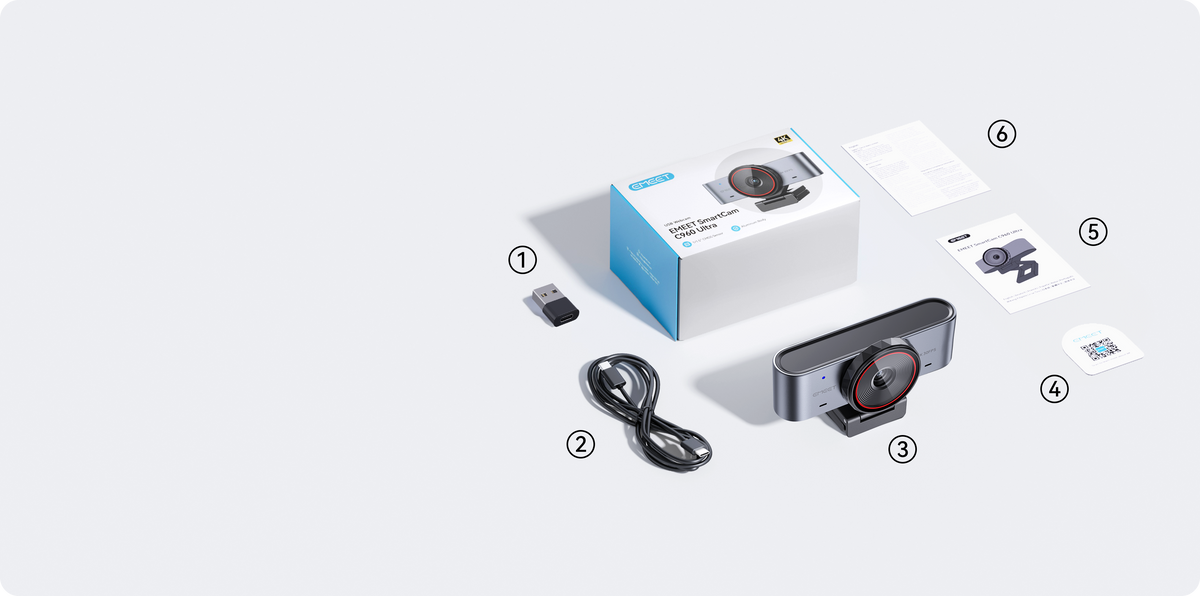
What's in the box?
- USB-C to USB-A Adapter*1
- 1.5m USB-C to USB-C Cable*1
- EMEET C960 Ultra*1
- Quick Start Guide Card*1
- Warranty*1
- User Manul*1
FAQ
Have a Question?
EMEET SmartCam C960 Ultra
プレミアムデザイン 超高精細 4K ウェブカメラ
How to Use the C960 Ultra?
You can quickly get started with the C960 Ultra by following these steps:
- Connect the Device
Plug the camera's USB connector directly into your computer's USB port. - Open Your Application
Launch the application you want to use (such as the system camera or video conferencing software). In the device selection list, choose C960 Ultra as the camera.
Once the camera starts outputting video normally, the indicator light will turn solid blue.
Note: The C960 Ultra features a driver-free design. Simply plug it into your computer and start using it—no additional drivers are required.
What mounting options does the C960 Ultra support?
The C960 Ultra supports two convenient mounting methods:
- Monitor Mount
Use the built-in clip to securely attach the camera to the top of your monitor or laptop screen. - Tripod Mount
The bottom of the camera features a 1/4-inch threaded hole, allowing it to be mounted on a standard tripod or universal stand.

What is the maximum resolution and frame rate of the C960 Ultra?
The C960 Ultra supports a maximum resolution of 4K (3840 × 2160) at 30 frames per second (fps). It also supports 1080p (1920 × 1080) at up to 60 fps, allowing you to choose the best setting for different scenarios such as video conferencing, streaming, or recording.
USER MANUAL
EMEET SmartCam C960 Ultra User Manual
Download Now
- Choosing a selection results in a full page refresh.